The very same evening we got our tools and supplies OFF the work table and ON the new shelves, we decided to build something, in this case, a nice shelf. Here is a picture of the kids hard at work.
Safety first!
 k
k

The very same evening we got our tools and supplies OFF the work table and ON the new shelves, we decided to build something, in this case, a nice shelf. Here is a picture of the kids hard at work.
Safety first!
k
AppCove developed a very simple user interface to the excellent gibberish-aes encryption library. This tool allows you to enter a passphrase, some text to encrypt, and encrypt it right in your browser.
No data is sent to the server — AppCove is never aware of the passphrase, plain text, or cipertext.
We use this tool to encrypt passwords and other information so that it can be stored in should-be-secure locations (like Google Sites or gmail).
Enjoy!
Working on a project recently where we were using an embedded youtube video iframe, as well as the Yahoo! Web Player. Autoplay was enabled on the youtube video.
If the Web Player was minimized, then the first time the user would click on a media link on the screen — the youtube video would restart!!!
If the Yahoo! Web Player was displayed to start with, then this did not happen.
As it turns out, this is controlled by the wmodeoverride option to the Yahoo! Web Player. If it is set to false, then the youtube-reload-issue does not happen.
http://webplayer.yahoo.com/docs/how-to-set-up/#customize
To prevent itself from appearing behind embedded YouTube videos, the Yahoo! WebPlayer changes the wmode setting of these embedded videos. The wmodeoverride parameter allows you to turn this feature on or off. Set wmodeoverride to ‘true’ to turn this feature on and set the parameter to ‘false’ to turn it off. The default setting is ‘true’.
<script type="text/javascript">
    var YWPParams =
    {
        wmodeoverride: false
    };
</script>
ImageMagick 6.2.8 comes with RHEL5. This is pretty ancient in terms of being able to do some more advanced manipulations, like -kerning, -distort, etc…
As it turns out, ImageMagick publishes their own RPM for RHEL. But if you try to just install it directly, you get something like this:
[root@boss ~]# rpm -Uvh http://www.imagemagick.org/download/linux/CentOS/x86_64/ImageMagick-6.7.9-6.x86_64.rpm
Retrieving http://www.imagemagick.org/download/linux/CentOS/x86_64/ImageMagick-6.7.9-6.x86_64.rpm
error: Failed dependencies:
libHalf.so.4()(64bit) is needed by ImageMagick-6.7.9-6.x86_64
libIex.so.4()(64bit) is needed by ImageMagick-6.7.9-6.x86_64
libIlmImf.so.4()(64bit) is needed by ImageMagick-6.7.9-6.x86_64
libImath.so.4()(64bit) is needed by ImageMagick-6.7.9-6.x86_64
libfftw3.so.3()(64bit) is needed by ImageMagick-6.7.9-6.x86_64
libgs.so.8()(64bit) is needed by ImageMagick-6.7.9-6.x86_64
libjasper.so.1()(64bit) is needed by ImageMagick-6.7.9-6.x86_64
liblcms.so.1()(64bit) is needed by ImageMagick-6.7.9-6.x86_64
libltdl.so.3()(64bit) is needed by ImageMagick-6.7.9-6.x86_64
liblzma.so.0()(64bit) is needed by ImageMagick-6.7.9-6.x86_64
librsvg-2.so.2()(64bit) is needed by ImageMagick-6.7.9-6.x86_64
libwmflite-0.2.so.7()(64bit) is needed by ImageMagick-6.7.9-6.x86_64
The answer is – use yum to take care of it:
As root, download the correct RPM from the ImageMagick site. Then uninstall the system ImageMagick. Then install this one.
http://www.imagemagick.org/script/binary-releases.php
wget http://www.imagemagick.org/download/linux/CentOS/x86_64/ImageMagick-6.7.9-6.x86_64.rpm
yum erase ImageMagick</p><p>yum install --nogpgcheck ImageMagick-6.7.9-6.x86_64.rpm
Note: because the version # is beyond the one shipped with RHEL, it will not be updated automatically. You will need to monitor ImageMagick for security updates and install them yourself.
Note: this is not recommended — replacing a RHEL package. But sometimes it is needed.
wget http://www.imagemagick.org/download/linux/CentOS/x86_64/ImageMagick-6.7.9-6.x86_64.rpm
yum erase ImageMagick
yum install --nogpgcheck ImageMagick-6.7.9-6.x86_64.rpm
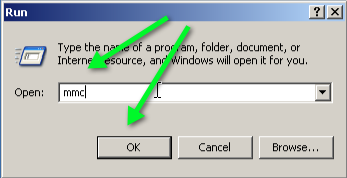
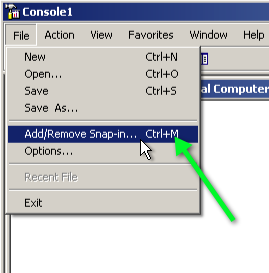
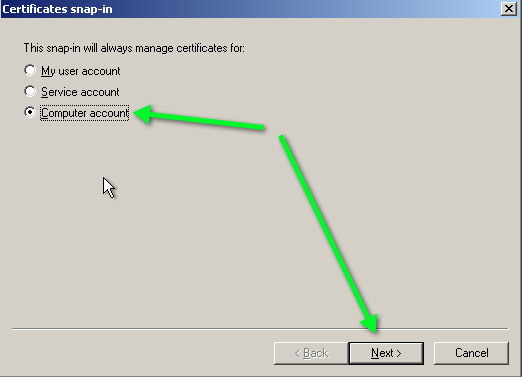
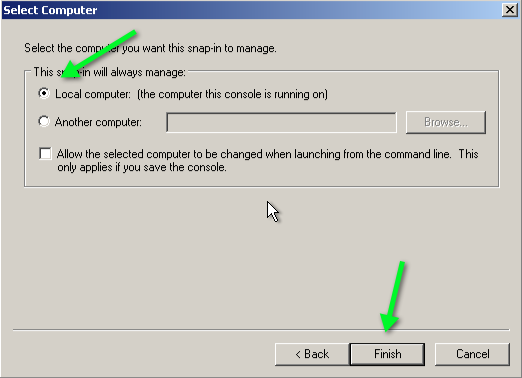
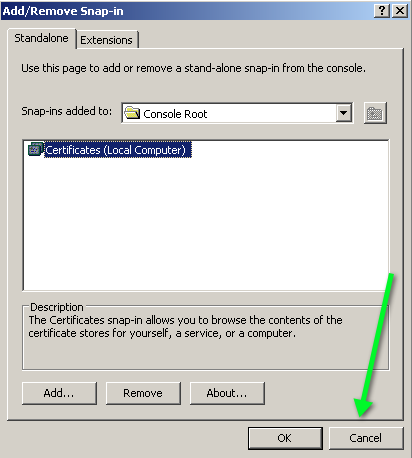
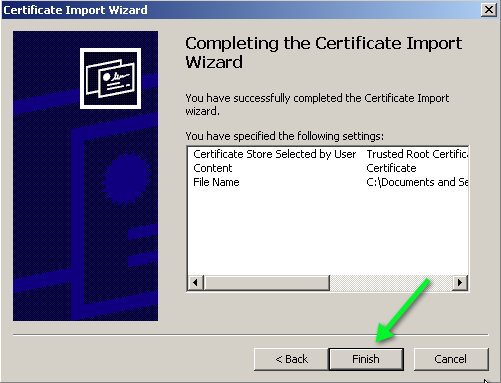
As a developer, it is great to be able to provide my own SSL certificates for preview and development sites. To this end, I’ve created my own Certificate Authority (CA), and need to import it into my computer and any client computer in order to avoid the scary SSL Certificate Warnings.
Applies to Windows XP. Not sure about Windows 7.





I use jQuery as the JavaScript library for most projects. It’s terribly convenient for selecting elements and processing them.
However, jQuery is not JavaScript, and there is a lot of things it cannot do. Rather than writing a separate set of functionality outside of jQuery, why not simply extend it on an application-per-application basis? It really is that easy. Perhaps if you get some functionality that is good enough, you will want to convert them into a formal plugin and post it to http://plugins.jquery.com/…
Here is the document that explains, in depth, how to author plugins.
http://docs.jquery.com/Plugins/Authoring
Here is an example at a very simple plugin that I whipped together while learning about plugins… It’s designed to accept an object of data, and apply it to any of the elements whose name attribute match the key of the data.
jQuery.fn.populate = function(Data) {
   this.each(function() {
      if (this.name in Data)
      {
         switch(this.type)
         {
            case 'text': this.value = Data[this.name]; break;
            case 'checkbox': this.checked = Data[this.name]; break
         }
      }
   });
   return this;
};
To call it… Select all input elements of the #Login form, and populate them with the passed data.
$('#Login :input').populate({ FirstName: 'sammy', LastName: 'jones' });
The .fn attribute of the jQuery object is where you attach new methods. The this member of those functions is set to the current jQuery object. The function must return the current jQuery object (self) unless explicitly stated otherwise.
Iterating through the elements of the current jQuery object should be done with this.each(…).
All in all, it’s very simple, and very powerful to be able to nest custom functionality into the jQuery object within a given application.

 The Gahooa Perspective
