I took this close-up of two forks with my digital camera (in 2006).


I took this close-up of two forks with my digital camera (in 2006).
When writing dynamic web applications, we use nginx as a front-end web server and apache+mod_wsgi as an application server.
It is the job of nginx to:
Ever run into the situation where you click log out, and then click the back button, and are still able to see the pages! That is bad. They are dynamic pages anyway, and should not be cached.
However, images, etc… SHOULD be cached. It is important that any references to images have a way to invalidate the cache. We append a number as a query string:
/path/to/script.js?192012129
This number is updated from time to time (via Python variable) when we need to invalidate the cache.
Anyway, here are some helpful nginx configuration directives.
# Send static requests directly back to the client
location ~ \.(gif|jpg|png|ico|xml|html|css|js|txt|pdf)$
{
    root  /path/to/document/root;
    expires max;
}

# Send the rest to apache
location /
{
    add_header Cache-Control 'no-cache, no-store, max-age=0, must-revalidate';
    add_header Expires 'Thu, 01 Jan 1970 00:00:01 GMT';
    proxy_pass http://127.0.0.1:8123;
}
“The IUS Community Project is aimed at providing up to date and regularly maintained RPM packages for the latest upstream versions of PHP, Python, MySQL and other common software specifically for Redhat Enterprise Linux. IUS can be thought of as a better way to upgrade RHEL, when you need to.”
http://www.appcove.com/yumrepo/
Imagine being able to combine the rock-solid stability of RedHat Enterprise Linux (or Oracle, Centos, Scientific) with the latest versions of popular software packages like PHP, Python, MySQL, mod_wsgi, redis, and others? The IUS Community Project is the answer.
Enterprise Linux is great for the stability, security, and compatibility. But sometimes you need a newer version of an installed package, like Python. At the time of this writing, RedHat is still not providing any standard way to obtain Python 3.2, MySQL 5.5, or PHP 5.4, years after they have been released.
The IUS Community project has provided AppCove, Inc. and all of our clients the perfect mix of stability and functionality. IUS has enabled us to focus on our core competencies (software development) while being confident that the packages we use are as secure and up-to-date as possible.
Our confidence in the IUS team is second to none. AppCove has worked in close conjunction with the IUS team on several occasions, and they have always been impeccably experienced, knowledgeable, and professional.
We highly recommend that any users of RedHat Enterprise Linux, Oracle Enterprise Linux, Scientific Linux, or Centos Linux take a close look at the IUS Community Project for their servers.
AppCove developed a very simple user interface to the excellent gibberish-aes encryption library. This tool allows you to enter a passphrase, some text to encrypt, and encrypt it right in your browser.
No data is sent to the server — AppCove is never aware of the passphrase, plain text, or cipertext.
We use this tool to encrypt passwords and other information so that it can be stored in should-be-secure locations (like Google Sites or gmail).
Enjoy!
Working on a project recently where we were using an embedded youtube video iframe, as well as the Yahoo! Web Player. Autoplay was enabled on the youtube video.
If the Web Player was minimized, then the first time the user would click on a media link on the screen — the youtube video would restart!!!
If the Yahoo! Web Player was displayed to start with, then this did not happen.
As it turns out, this is controlled by the wmodeoverride option to the Yahoo! Web Player. If it is set to false, then the youtube-reload-issue does not happen.
http://webplayer.yahoo.com/docs/how-to-set-up/#customize
To prevent itself from appearing behind embedded YouTube videos, the Yahoo! WebPlayer changes the wmode setting of these embedded videos. The wmodeoverride parameter allows you to turn this feature on or off. Set wmodeoverride to ‘true’ to turn this feature on and set the parameter to ‘false’ to turn it off. The default setting is ‘true’.
<script type="text/javascript">
    var YWPParams =
    {
        wmodeoverride: false
    };
</script>
ImageMagick 6.2.8 comes with RHEL5. This is pretty ancient in terms of being able to do some more advanced manipulations, like -kerning, -distort, etc…
As it turns out, ImageMagick publishes their own RPM for RHEL. But if you try to just install it directly, you get something like this:
[root@boss ~]# rpm -Uvh http://www.imagemagick.org/download/linux/CentOS/x86_64/ImageMagick-6.7.9-6.x86_64.rpm
Retrieving http://www.imagemagick.org/download/linux/CentOS/x86_64/ImageMagick-6.7.9-6.x86_64.rpm
error: Failed dependencies:
libHalf.so.4()(64bit) is needed by ImageMagick-6.7.9-6.x86_64
libIex.so.4()(64bit) is needed by ImageMagick-6.7.9-6.x86_64
libIlmImf.so.4()(64bit) is needed by ImageMagick-6.7.9-6.x86_64
libImath.so.4()(64bit) is needed by ImageMagick-6.7.9-6.x86_64
libfftw3.so.3()(64bit) is needed by ImageMagick-6.7.9-6.x86_64
libgs.so.8()(64bit) is needed by ImageMagick-6.7.9-6.x86_64
libjasper.so.1()(64bit) is needed by ImageMagick-6.7.9-6.x86_64
liblcms.so.1()(64bit) is needed by ImageMagick-6.7.9-6.x86_64
libltdl.so.3()(64bit) is needed by ImageMagick-6.7.9-6.x86_64
liblzma.so.0()(64bit) is needed by ImageMagick-6.7.9-6.x86_64
librsvg-2.so.2()(64bit) is needed by ImageMagick-6.7.9-6.x86_64
libwmflite-0.2.so.7()(64bit) is needed by ImageMagick-6.7.9-6.x86_64
The answer is – use yum to take care of it:
As root, download the correct RPM from the ImageMagick site. Then uninstall the system ImageMagick. Then install this one.
http://www.imagemagick.org/script/binary-releases.php
wget http://www.imagemagick.org/download/linux/CentOS/x86_64/ImageMagick-6.7.9-6.x86_64.rpm
yum erase ImageMagick</p><p>yum install --nogpgcheck ImageMagick-6.7.9-6.x86_64.rpm
Note: because the version # is beyond the one shipped with RHEL, it will not be updated automatically. You will need to monitor ImageMagick for security updates and install them yourself.
Note: this is not recommended — replacing a RHEL package. But sometimes it is needed.
wget http://www.imagemagick.org/download/linux/CentOS/x86_64/ImageMagick-6.7.9-6.x86_64.rpm
yum erase ImageMagick
yum install --nogpgcheck ImageMagick-6.7.9-6.x86_64.rpm
As part of an utility easement I negotiated with an adjacent property owner, we agreed that I would improve his driveway using fill from my property.
This took hundreds (if not thousands) of tons of dirt and rock to complete. Nice!
Another excellent project completed by Simondale Excavating from Tyrone, PA.
Before:

After:


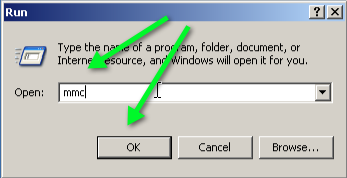
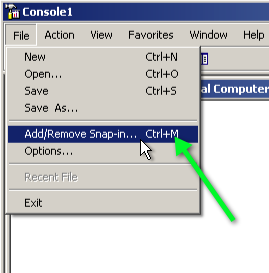
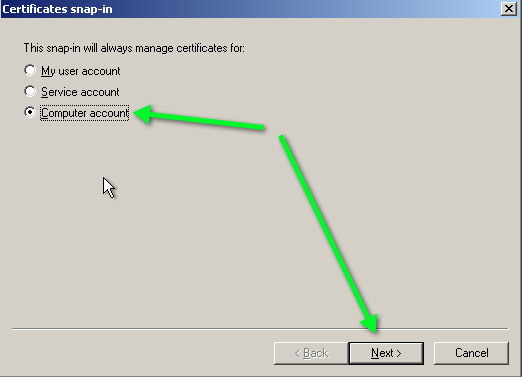
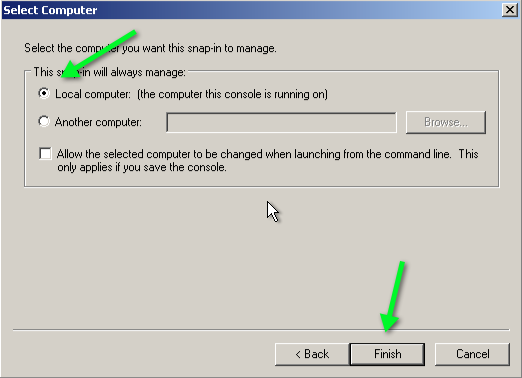
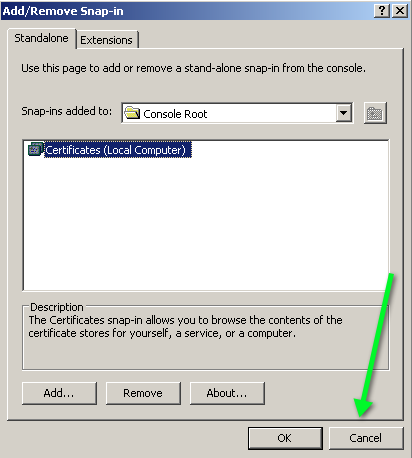
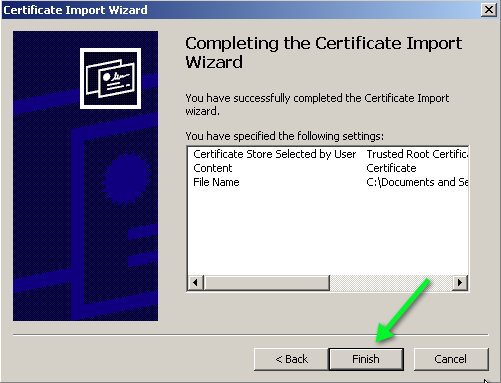
As a developer, it is great to be able to provide my own SSL certificates for preview and development sites. To this end, I’ve created my own Certificate Authority (CA), and need to import it into my computer and any client computer in order to avoid the scary SSL Certificate Warnings.
Applies to Windows XP. Not sure about Windows 7.





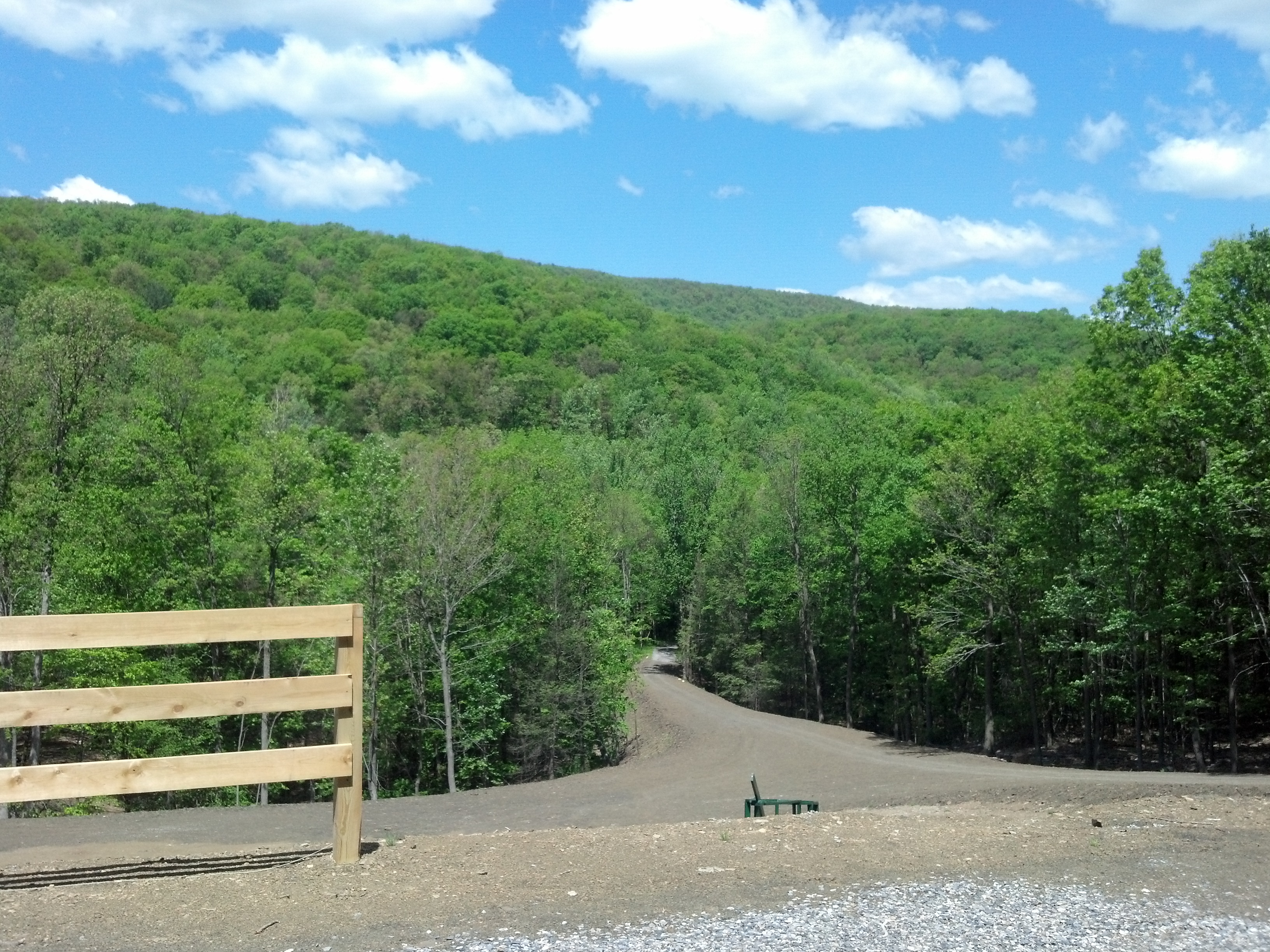
It’s arrived. The nice weather. The leaves. The sky. All so pretty.
 The Gahooa Perspective