Update [1] on Fedora vs Redhat Enterprise Linux

This is in reference to https://blog.gahooa.com/2009/01/18/fedora-or-redhat-enterprise-linux-in-a-production-environment/.

After the excellent comment by Sergio Olivo, I did some heavy looking into the Extra Packages for Enterprise Linux project (EPEL for short).  On a brand-spanking-new RHEL 5 box, I installed the YUM repository for EPEL, and quite immediately had access to tons of extra packages.  Erlang is there.  Git is there.  Memcached is there.  Sweet!

However, EPEL does not update or replace the version of any packages provided by RHEL.

So the problem of having out of date versions of PHP and Python still remain.  Next I looked into using a third party RPM repository (provided by RackSpace).  They provide updated versions of PHP and a number of PHP modules.  But alas, this created incompatibilities with the EPEL packages for PHP.  This is because EPEL packages are targeted for RHEL versions. Bla…

So here is what I decided to do (haven’t done it yet, but will soon).  We will build and package our own custom set of RPMs for RHEL 5, and publish them in an RPM repository.  Then we will simply point each server to that repository in addition to the main RHEL repository, and poof, problem solved.  We may also use EPEL for things like Erlang and git.  Or we may compile from source.  Not sure.

For those of you who are not familiar with YUM RPM repositories, they can be as simple as a specail directory structure served by a webserver.

There are a few items remaining to be concluded, but they should fall into place fairly quickly.

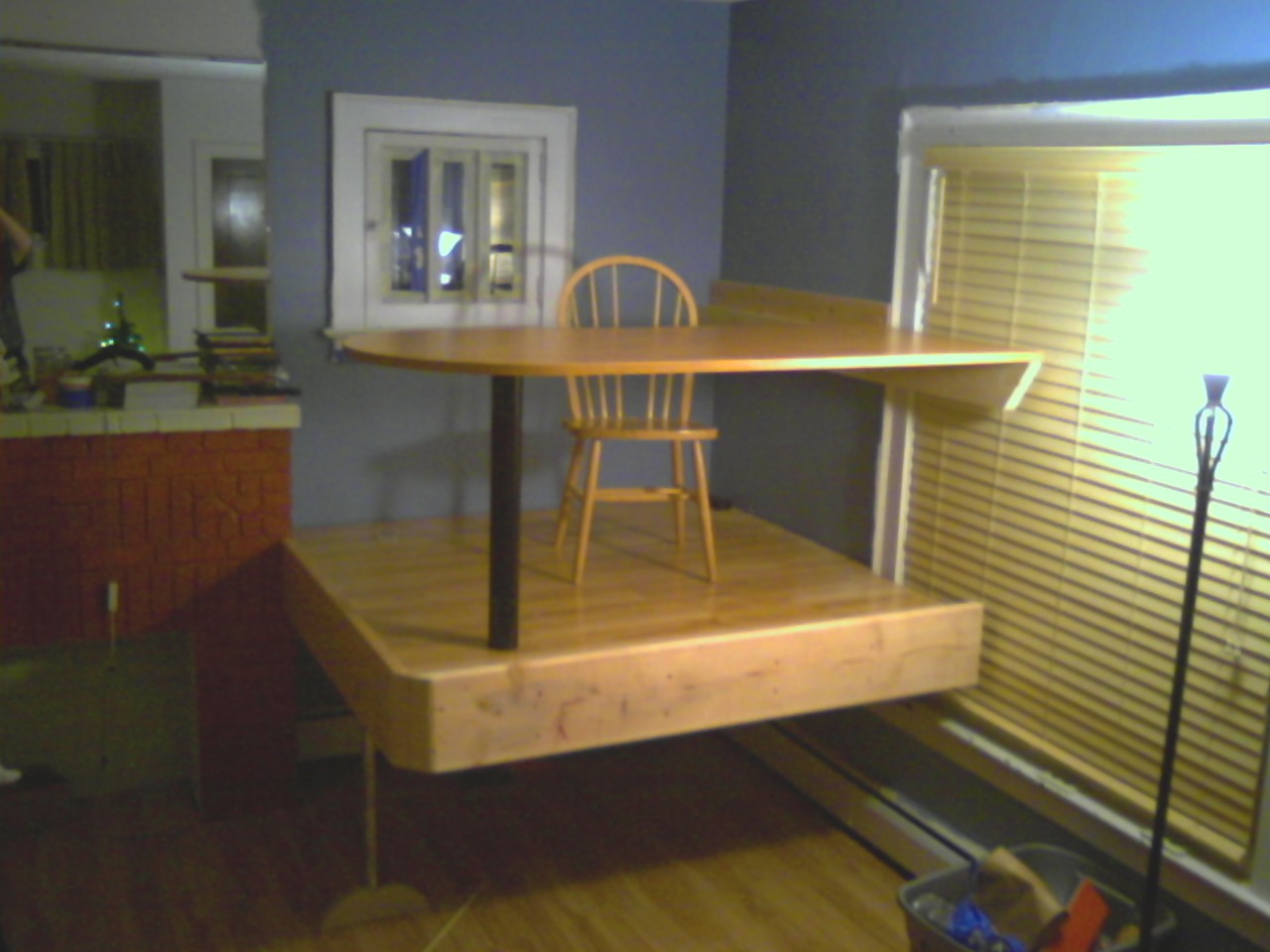
My new corner office with a view

Finally!  It’s (structurally) done!

This is most likely something you have never seen before, but…  We recently had our 4th child, a little girl named Anna.  So I need to clear my office out of the one bedroom that will soon be hers (yes, a bit late).  Needing somewhere to setup, I decided on the living room.  I really like being around the family in the evening/weekend when I am working on various projects.

So my boys and I undertook making an office in the corner of the living room.  Not a “normal” office, but a “floating” office.  In this way, we achieve several benefits:

  • The kids will play under the platform.
  • They love it
  • I will work on top of it.
  • I get a good perspective of the house.
  • Gained square footage
  • A “cool” factor for the kids.
  • The living room still feels “open”

The structure

This platform was made by creating a doubled 2″x6″ box about 6’x6′.  It was built one board at a time, each glued and screwed together.  It is attached directly to the studs with (16) 3/8 x 4 hex lag screws, and (12) tapcons into the fireplace.

The single floor support consists of an 80 pound steel beam (3×5″ tube), wrapped in an anti-fatigue mat (head bang protection).  This was chosen for its low profile and stiffness, providing the kids with more headroom.

The flooring is made of jointed 2×10 boards, all glued and screwed down.

The platform was encased in additional 2×10 boards, creating a rim both for apperance and to prevent things from rolling off the platform.

The single leg is a length of galvanized steel pipe threaded into a custom-made maple leg.

Hardwood laminate (pergo) was laid down on top of the 2×10 flooring.

The desk top is a custom mounted “Bullet Table” provided by Ellis Office Supply.

The Photos

From across living room, seated.

From across living room, seated.

From the middle of the room, standing.

From the middle of the room, standing.

Underneath

Underneath

Conclusion

Perhaps a bit strange?  Sure. Functional?  Completely. Fun?  Totally...

Now, what kind of computer deserves to be placed on that nice platform?  I’d love to hear comments on this one.